
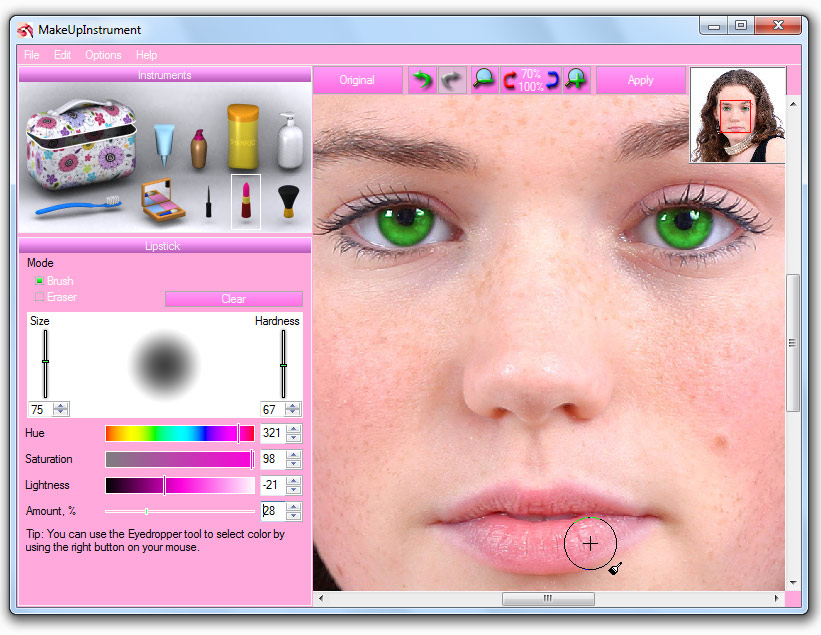
 MakeUp Instrument is a fast and easy retouching software.
Simple presentation of instruments allows you to understand immediately
how it works. Using this program, you can clean up face and skin
imperfections, such as wrinkles, acne, and tattoos. MakeUp Instrument is
your own digital cosmetic bag. Don’t get upset if your lipstick has
been wiped off on your portrait. You need only one click on lipstick
instrument and try different colors. Using MakeUp Instrument you can extremely fast and easy improve your portrait.
MakeUp Instrument is a fast and easy retouching software.
Simple presentation of instruments allows you to understand immediately
how it works. Using this program, you can clean up face and skin
imperfections, such as wrinkles, acne, and tattoos. MakeUp Instrument is
your own digital cosmetic bag. Don’t get upset if your lipstick has
been wiped off on your portrait. You need only one click on lipstick
instrument and try different colors. Using MakeUp Instrument you can extremely fast and easy improve your portrait. MakeUp Instrument important features:
• Drag and drop to open photos in this photo editor.
• Copy/Paste image from Clipboard.
• PSD file (PhotoShop Format) support in Editing.
• Multi Language support.
• Save to computer as .jpg, .png, .bmp and other file formats.
• And many more features…
Main menu includes these tools:
• Lipstick
• Eyeshadow
• Eyeliner
• Blusher
• Glamour Skin
• Shampoo
• Toothbrush
• Return to Original
 With right click on cosmetic bag you will have access to extra instruments:
• Skin Cleaner
• Blur
• Sharpen
• Clone
• Liquify
• Red Eye Removal
• Rotate / Scale
• Brightness-Contrast
• Levels
• Glow
• Object Removal
Supported Operating Systems: Windows 2000, XP, Vista, Windows 7, Windows 8.
Size: 3.19 MB
Download MakeUp Instrument
Post a Comment